2026 ClubLink Ballot System
Below are the answers to the most common questions regarding the system
Open Ballot Windows
If you log in right now, you can submit a ballot for the following play dates:
*Note: The ballot for the earliest listed date closes tonight at 8 p.m.
UNDERSTANDING THE NEW SYSTEM
-
HOW TO SUBMIT A BALLOT REQUEST
-
Creating a ballot
The ballot system is designed to provide an equitable booking process for all Members. Before entering the system, please keep the following timeline in mind:
- The ballot window: You can submit your request between 10 and seven days in advance of your desired date of play.
- Confirmation emails: You will receive an immediate confirmation email as soon as your ballot is submitted. You will receive a second email with your official tee time results when the ballot is processed six days prior to your date of play.
- STEP-BY-STEP INSTRUCTIONS
-
1. Log in to your account and navigate to Tee Times Plus.
2. Select "Ballot Request" from the menu on the left side of the screen.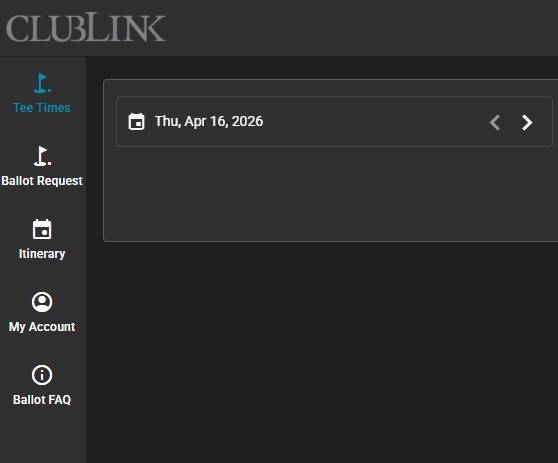
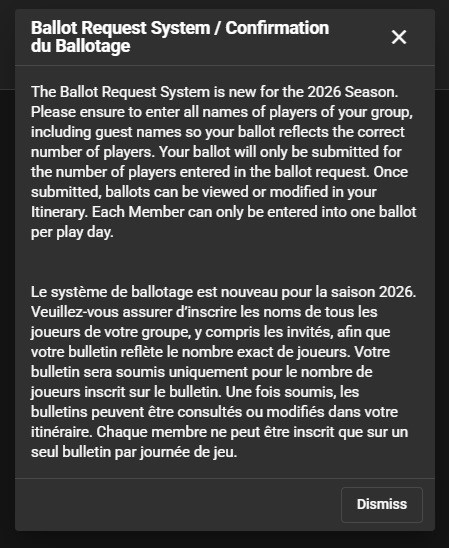
3. Review the informational pop-up outlining the new 2026 season rules. Complete the short Cloudflare "Verify you are human" security check if prompted, then click "Dismiss."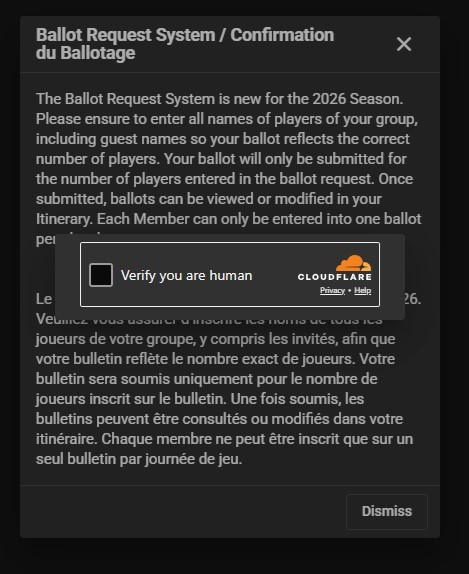
4. On the "Date" screen, use the calendar to select your desired day of play, then click "Next ."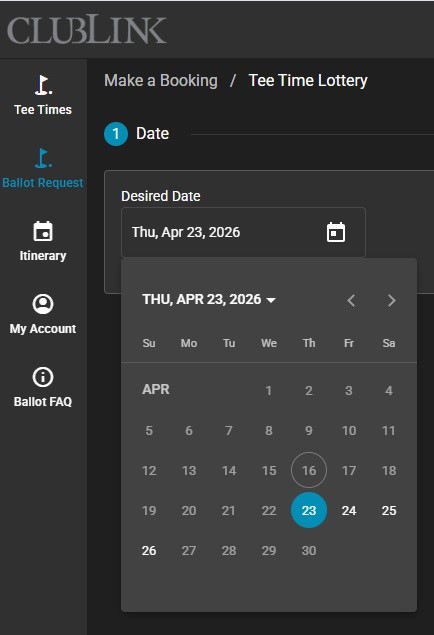
5. On the "Lottery Details" screen, set your "Desired Time," "Earliest Time," and "Latest Time."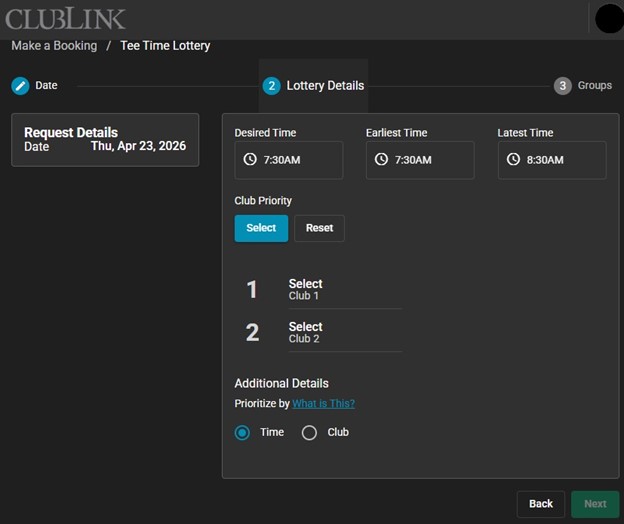
6. Select your "Club Priority" to choose and rank up to four preferred courses.
7. Choose your priority method under "Additional Details," then click "Next." Selecting Course tells the system to prioritize your top-ranked location, searching for all available times within your window at your first-choice course before moving to your second. Selecting Time tells the system to prioritize your schedule, checking all selected courses for your exact requested time before gradually expanding the search outward.
8. On the "Groups" screen, your name will automatically appear. Use the dropdown menus to add the remaining Members of your group or to designate guests.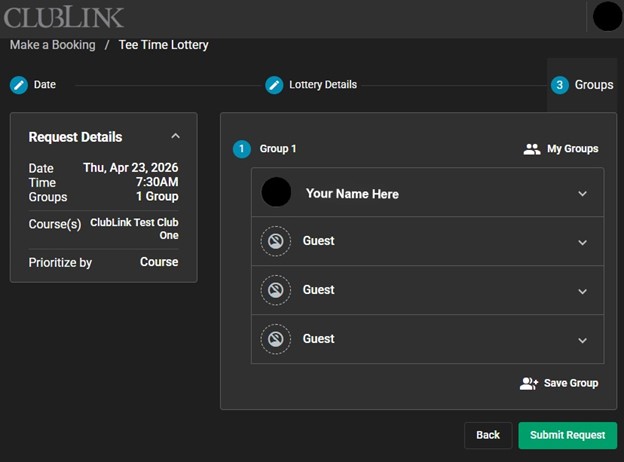
9. Click "Submit Request."
10. A final confirmation screen will appear displaying your request details, and your initial confirmation email will be sent to your inbox.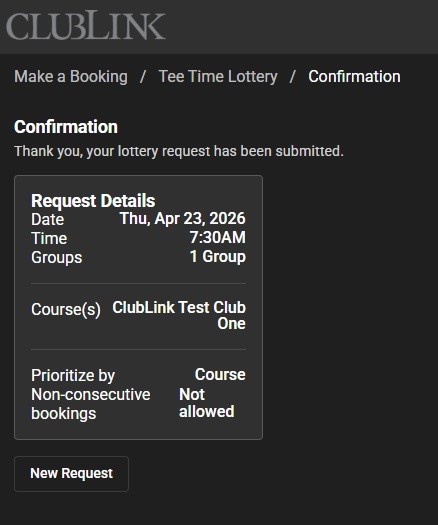
11. Please note - after your ballot is completed you can review it in the "Itinerary" section of Tee times Plus.
Also note - during processing (after 8 p.m. 7 days out to 4 p.m. 6 days out), your ballot will not be visible in the itinerary section.
- What is the main reason for moving to a weighted ballot system?
-
Our primary goal is to ensure equal and fair access to the tee sheet for all Members. In the previous system, access was determined by who accessed the system first. Precise timing and internet connection speed could present advantages for some Members. A weighted ballot removes that stress and prioritizes fairness by looking at recent ballot history to determine who gets what time. We are also prioritizing the Member booking experience. This process will be more technologically reliable
- Will I get less access to tee times?
-
For most Members, access will feel about the same or slightly better because we are taking ballot history into account when assigning tee times.
- Will further changes be made to the system?
-
Yes. Our primary goal is to continually enhance the Member booking experience. We will be closely monitoring the ballot system and gathering feedback throughout the season. If adjustments are needed to improve fairness or streamline the process, we will not hesitate to make updates. We are committed to constantly reviewing and refining the system to ensure it works as effectively as possible for all Members.
- What is the difference between selecting course preference and time preference?
-
When building your ballot, you can tell the system what is more important to your group: where you play or when you play.
• Course preference: The system prioritizes placing you on your top-ranked course. It will search for all available tee times within your acceptable time window at your first-choice course before checking availability at your second choice, and so on. Choose this option if playing at a specific location is your main priority.
• Time preference: The system prioritizes securing a tee time as close as possible to your ideal requested time. It will check all your selected courses for that specific time before gradually expanding the search outward within your acceptable window. Choose this option if your schedule is strict and when the tee time matters more than the course.
BOOKING AND MANAGING A TEE TIME
- Tee Times Plus Tee Time Booking System
-
STEP-BY-STEP INSTRUCTIONS
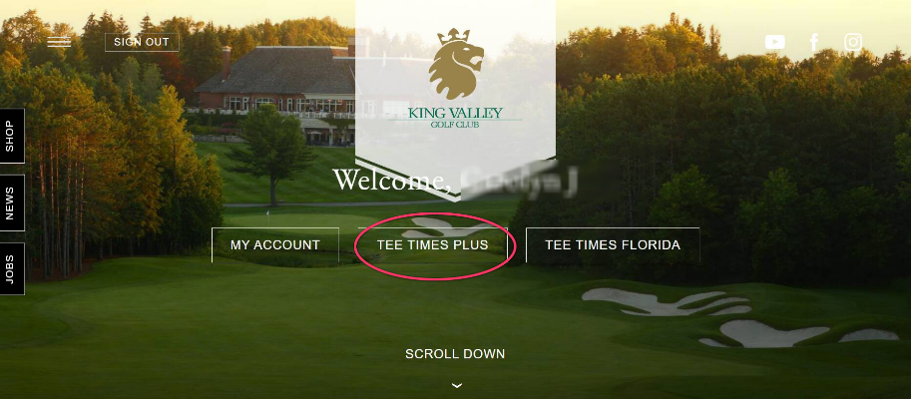
Log in to your account and navigate to Tee Times Plus (for Canadian courses) or Tee Times Florida (if playing in Florida).
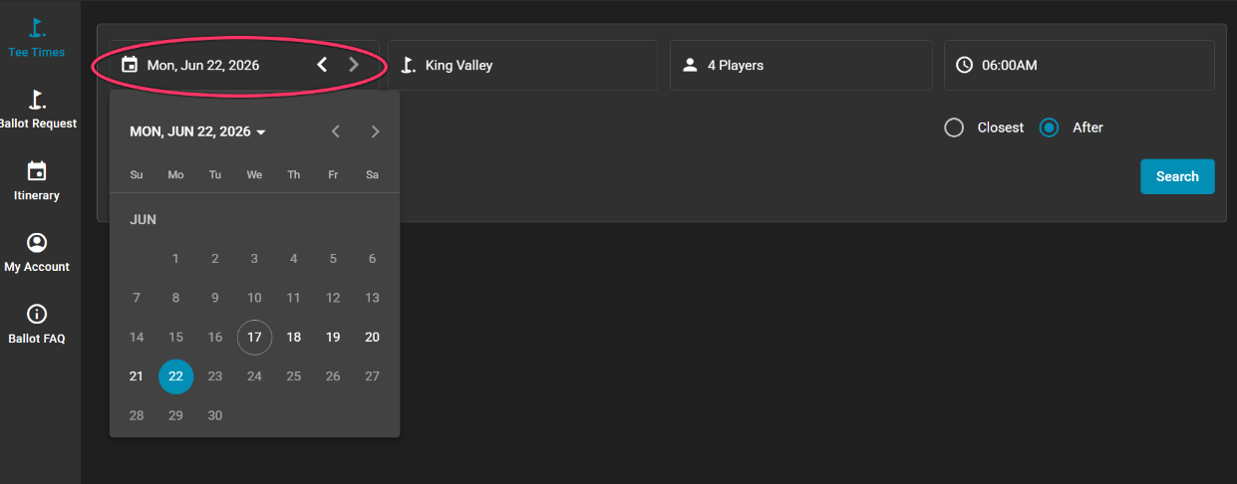
On the main dashboard, use the calendar field in the top left corner to select your desired day of play.
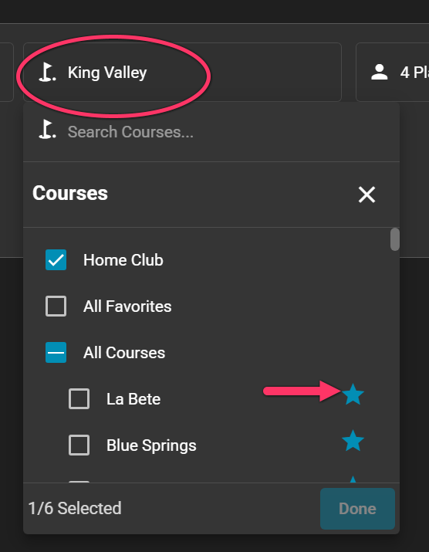
Choose your course from the selection menu. Your home club will automatically be selected by default, but you can use the star icons to favorite other courses for future quick-selection.
Adjust the player dropdown menu to select the total number of golfers for the reservation (from 1 to 4 players).
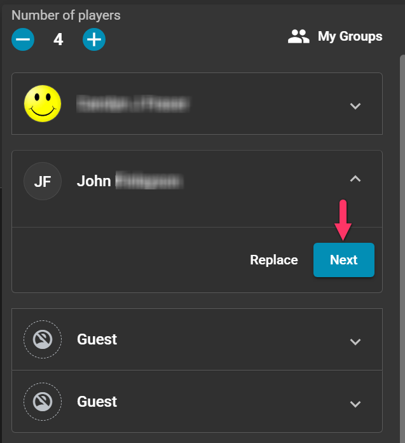
Look at the "Players" section where your name is automatically filled in slot one, and click Replace on the first "Guest" slot.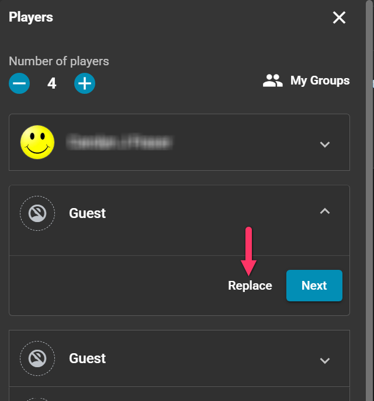
Type your playing partner's name into the search bar, select their profile when it pops up, and click Next to move to the remaining TBD slots until your group is filled. Click Done to proceed.
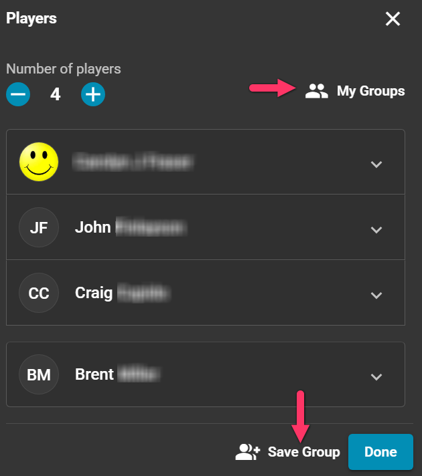
Optional: To save this foursome for future bookings, type a name into the group field (e.g., "Monday Group") and save it. Next time, you can instantly load this roster by clicking the My Groups tab. Click Done to proceed.
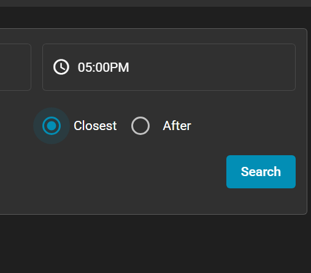
Move to the top right of the screen to select your desired playing time. Choose whether you want the system to search for the Closest Time to your request, or exclusively for Times After your selection, then click Search.
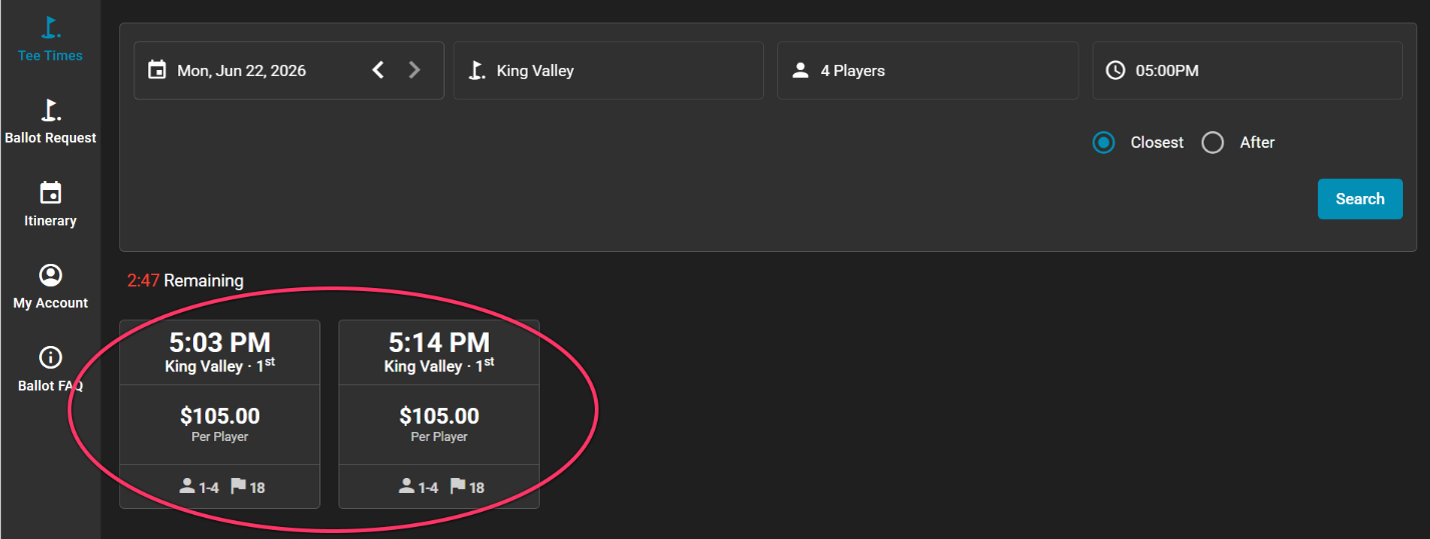
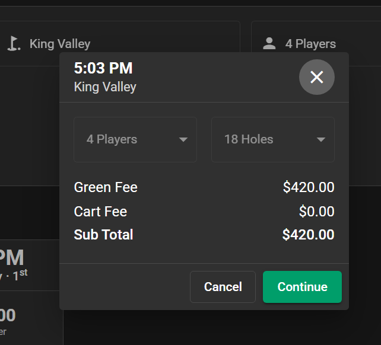
Review the generated list of available tee times, click on your preferred slot, and click Continue to verify the core details (e.g., 4 players, 18 holes).
On the final review page, double-check your booking fees, date, time, and golf course.
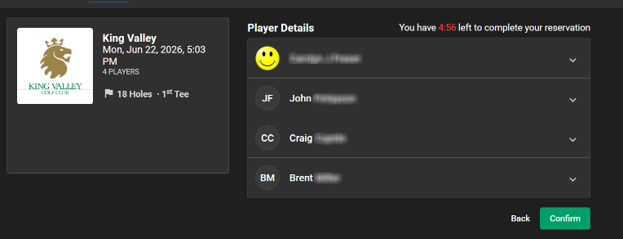
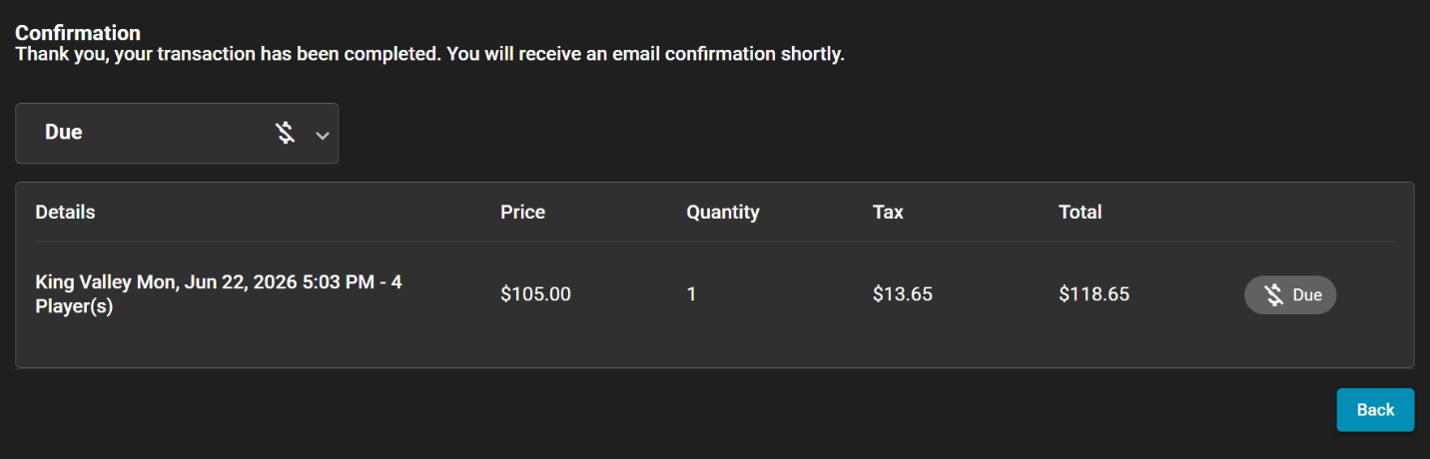
Click Confirm to finalize the reservation. A completion screen will appear, and the system will officially log your tee time.
- Managing a Tee Time
-
STEP-BY-STEP INSTRUCTIONS
Log in to your account and navigate to Tee Times Plus (for Canadian courses) or Tee Times Florida (if playing in Florida).
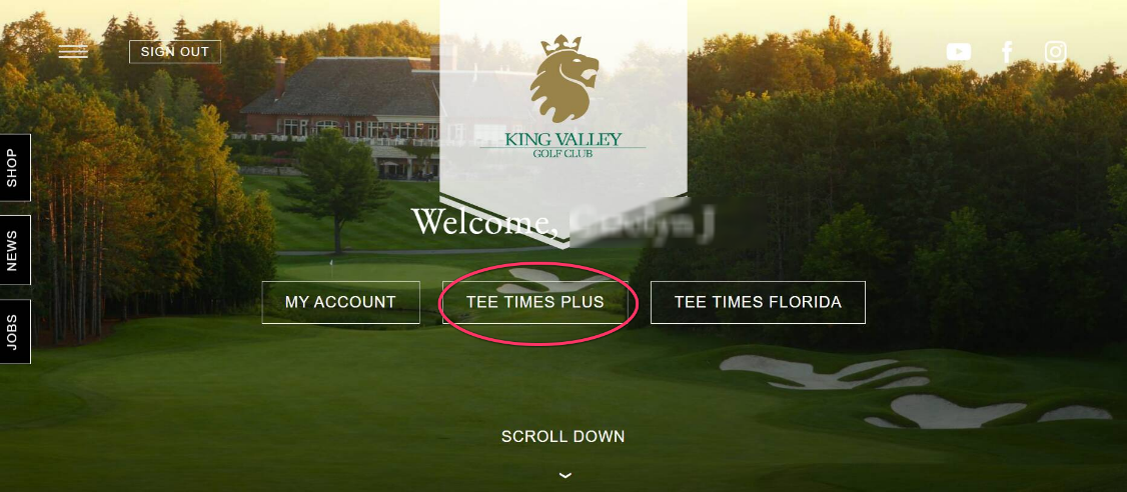
Select "Itinerary" from the menu options to automatically view your current itinerary.
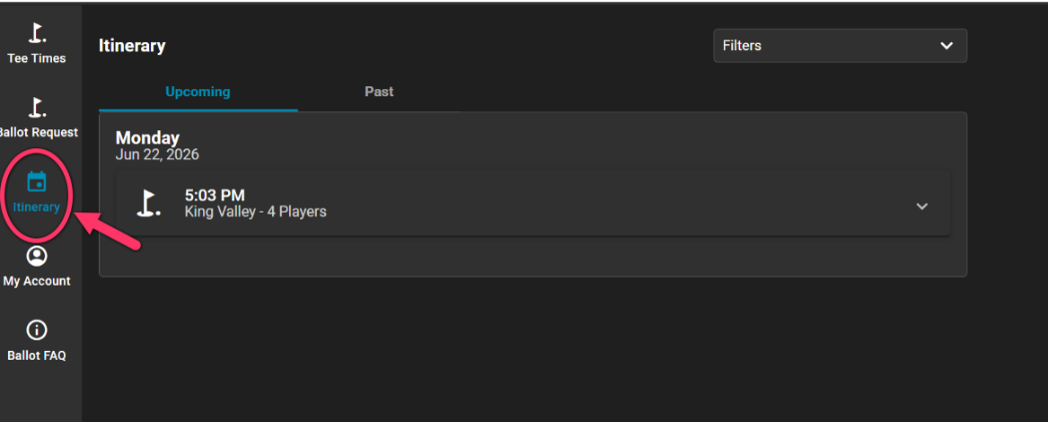
Under "Upcoming," click on the reservation you want to modify to expand and review its details (time, club, and player list).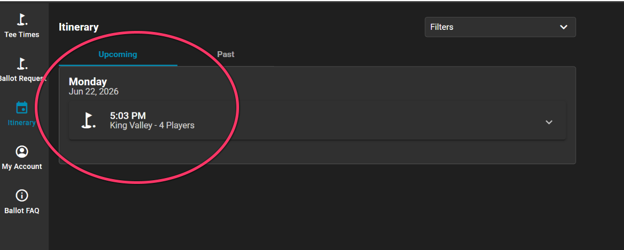
Click the "Manage" button in the bottom right corner of the screen.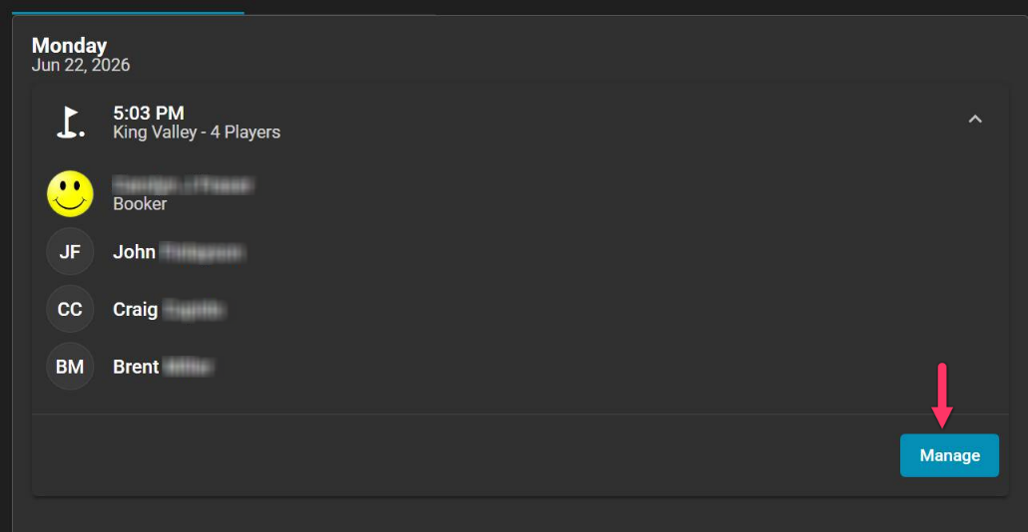
Select "Move Reservation" from the management options. (Note: You can also use this menu to change individual players or cancel the booking entirely).
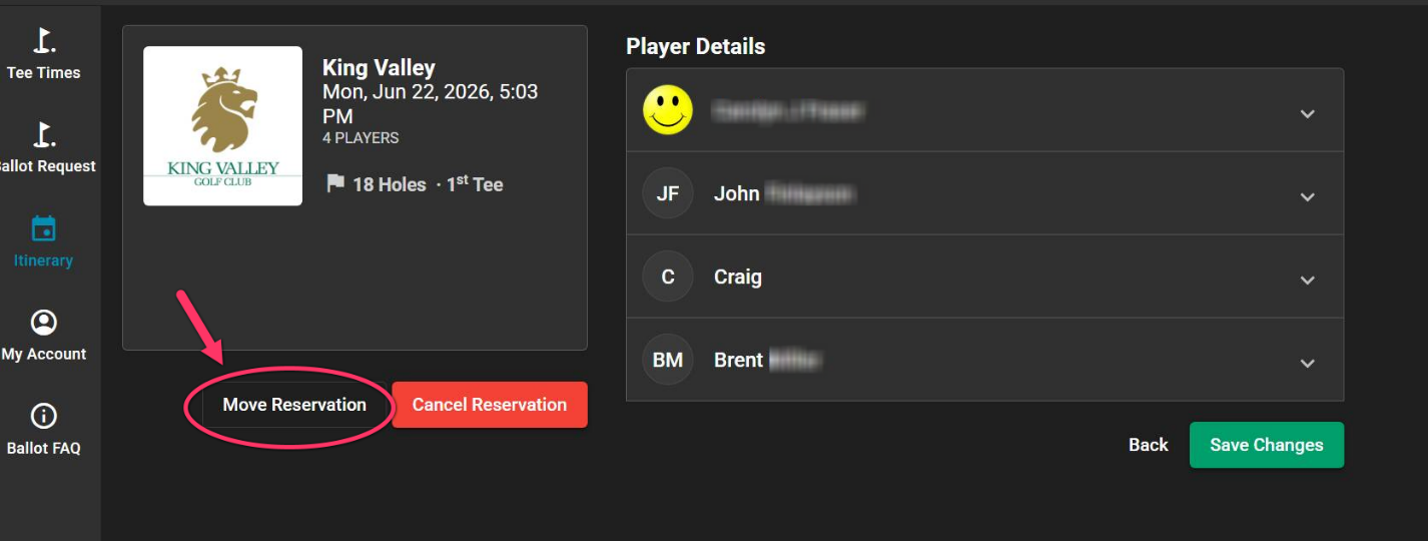
On the search screen, keep your current club or use the dropdown to change locations if desired. Adjust the calendar and time field to your new preferred timeframe, select your search preference (such as "closest"), and click to search.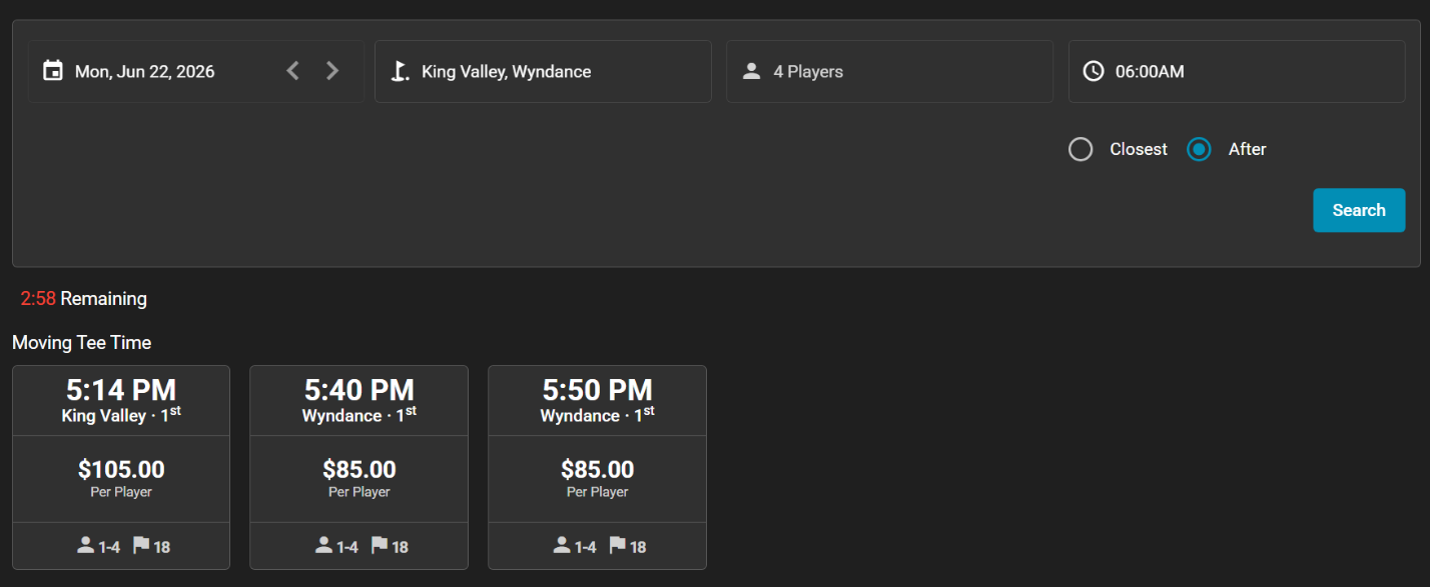
Review the available options, select your new desired tee time slot, and click "Continue."
On the verification screen, review the updated time, course, and player details to ensure everything is correct.
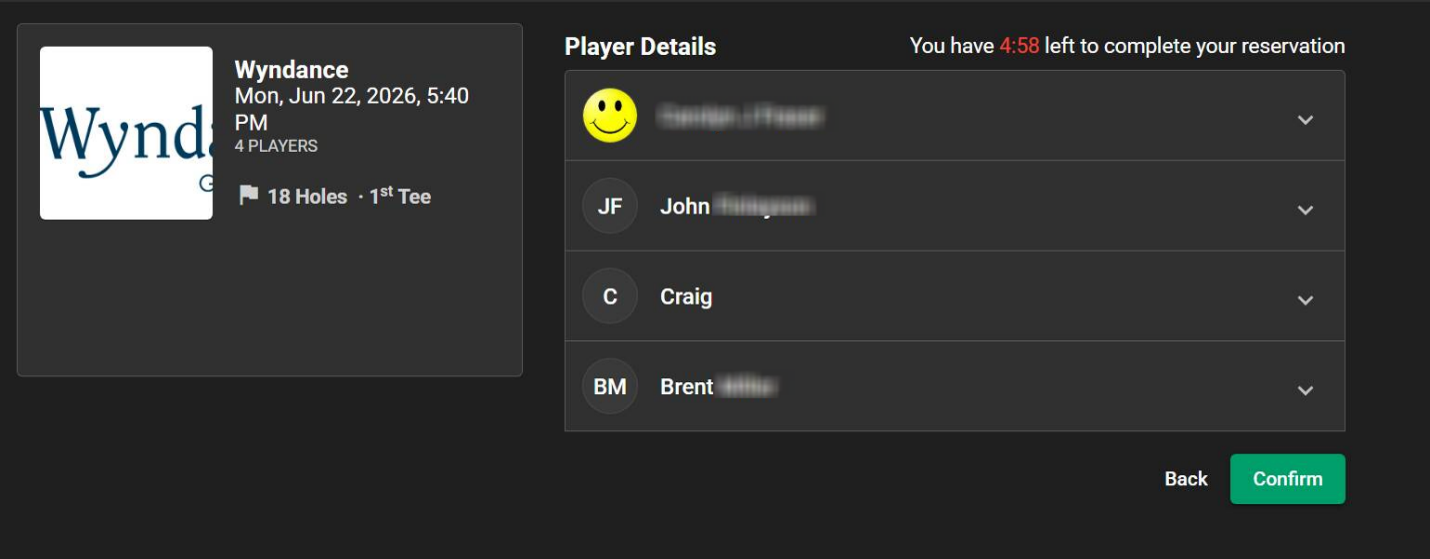
Click "Confirm."
A final confirmation screen will appear displaying your updated tee time, and an automated email update will be sent to you.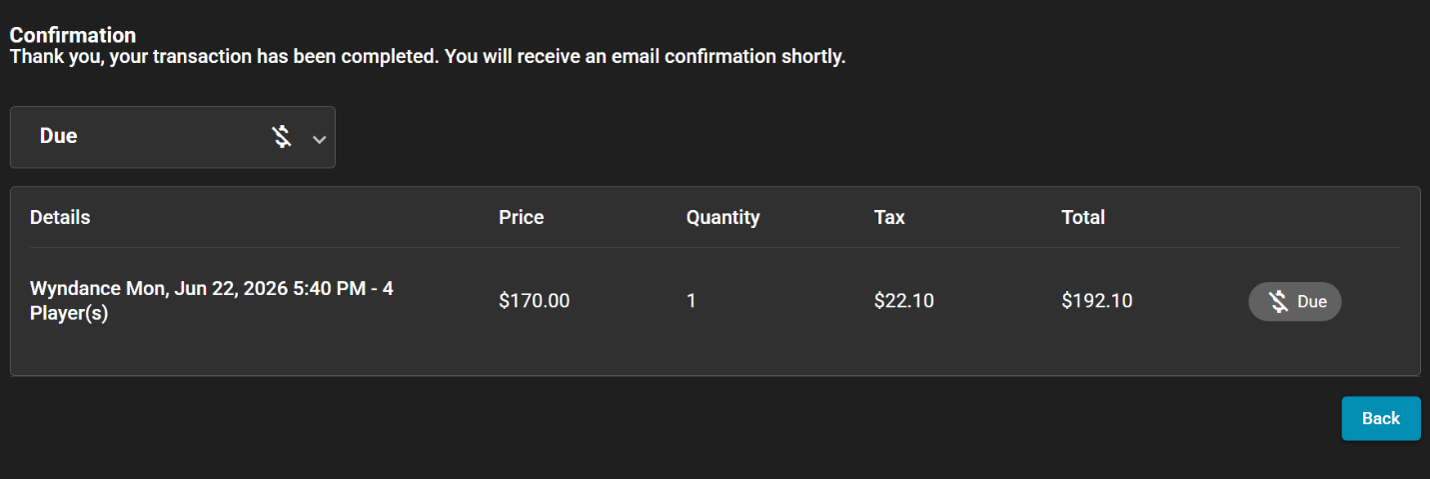
THE USAGE POINTS SYSTEM
- How is a ballot "weighted"? (The Points System)
-
To ensure fairness, the ballot uses a usage points system. Every time a Member is awarded a tee time via a ballot, points may be applied to their profile. In future draws, priority is given to Members with fewer points. If a tee time is booked outside of the ballot window (within five days of play), no points will be awarded.
- How are points calculated?
-
Points are assigned based on how closely the system matched a request. The better the match, the more points are assigned.
- How are groups prioritized?
-
Priority is determined by the average points of the entire group. The system takes the points of every Member listed on your ballot, adds them up, and divides them by the number of Members.
- How long do points stay on my profile?
-
Your priority score is based on a rolling 30-day window. The system calculates the total points you've earned over the past 30 days before the current ballot draw. Points older than 30 days are automatically removed from your profile. This ensures that your usage points are up to date and reflect your recent activity.
-
Why don't you show my exact points?
-
Our tee-time ballot uses a dynamic weighting model rather than a static point balance. Your priority is recalculated before every draw, factoring in recent access and demand for selected times. We keep exact numerical totals private to ensure fairness and prevent "gaming" behaviours, such as submitting artificial requests to boost priority. This approach provides transparency on the principles driving the system, allowing Members to understand what affects their priority without needing to track complex calculations.
- Do I get my points back if the course closes due to weather or unplayable conditions?
-
No. Usage Points are assigned based entirely on the success of the ballot itself, not on whether the round is ultimately played. If a course closes due to weather or unplayable conditions, the points applied for that successful ballot will remain on your profile.
- Will I accumulate points for playing in Member events?
-
No. Usage points are only assigned through the daily ballot process. Participation in organized Member events does not affect your rolling points average.
SUBMITTING A BALLOT
- How do I submit a ballot?
-
Submitting a ballot is a simple process. You can do so through Tee Times Plus. Within Tee Times Plus, there is a "Submit a Ballot" button that will guide you step-by-step through submitting your request. If you need assistance, contact us at memberservices@clublink.ca or 800-273-5113.
- What details do I need to know before submitting the ballot?
-
To complete your ballot, and to have the best chance of success, you will need to know the names of all the Members in your group, your preferred Club locations, and your preferred time windows (including your earliest and latest acceptable times).
-
When do I submit my request?
-
The ballot operates on a 10-day cycle. You will receive a confirmation email, once the ballot has been submitted, and when it has been processed. You can submit your request within the following window:
Action
Timing
Example: Playing on Monday, May 11
Ballot Opens
10 days prior at 12 a.m.
Friday, May 1 at 12 a.m.
Ballot Closes
Seven days prior at 8 p.m.
Monday, May 4 at 8 p.m.
Results Published
Six days prior at 4 p.m.
Tuesday, May 5 at 4 p.m.
- Why does the ballot operate every day instead of just on weekend mornings?
-
We run the system daily to maintain a consistent, predictable routine. Demand is high throughout the week, including weekdays. By holding the ballot on all days, we ensure that fairness isn't restricted to just Saturday and Sunday.
- Why do I have to provide names for all players on my ballot?
-
Here is why a ballot with more names makes the system work better for you:
1. It increases your chances of a successful ballot - The system is designed to find the best possible match for your group. When you enter all Member names, the system has the maximum amount of data to work with. It can look at a wider variety of open slots and combinations to place you as close as possible to your preferred time. Simply put: the more complete your roster, the more "placements" the system can attempt, making a successful result much more likely.
2. It ensures the weighting system stays fair - Our new system is built on fairness. Every time you submit a ballot, the system tracks your history to ensure that those who haven't secured a peak time recently are given priority in the next round. By entering all names, you ensure that every Member in your group is correctly "credited" within the weighted system. This prevents anyone from "gaming" the system and ensures priority remains accurate for the entire membership.
3. It protects tee sheet inventory for everyone - Accuracy is key to a healthy tee sheet. When a ballot is submitted with "TBA" or guests, the system has to "hold" those potential spaces, which can unnecessarily tie up inventory that could otherwise be awarded to another Member. By providing names upfront, we ensure that every available tee time is used effectively, maximizing the number of Members who get to play each day. - Can I enter the ballot as a single?
-
Yes. To maximize course utilization, the system will auto-pair you with an existing group.
- Can I submit a request for multiple courses to increase my chances?
-
Yes. You are limited ballot per play date, selecting up to six courses, ranked in priority order.
You may also select whether to prioritize course or time, and the system will process your ballot accordingly, starting with your top priority. Including multiple courses on a single ballot will improve your chances on busy days when priorities are set clearly.
- Can I enter more than one foursome in the ballot?
-
No. To maintain fairness, a Member can only be submitted on one ballot (representing a single foursome or smaller group) for each day of play.
- What if I want to bring a guest?
-
Please note that including a guest will restrict your ballot to times on the tee sheet where guest play is permitted. Tee time restrictions for guests vary by day, time of day, and location.
- How many ballots can I submit for each day of play?
-
To maintain fairness, Members can only submit one ballot (representing a foursome or less) for each day of play. The system guarantees that each name on every ballot represents a unique golfer. It actively prevents a Member ID from appearing on more than one ballot per day. If a ballot contains a Member who is already listed on another ballot (at any ClubLink property), the system will block the ballot, and you will be notified immediately at the time of submission. This prevents duplicate bookings and ensures that 100 per cent of the tee sheet inventory is available.
- Will I be notified when another Member submits a ballot with my name?
-
Yes. To ensure transparency, you will receive an automatic confirmation email the moment your name is entered onto a ballot by another Member.
- Who can edit the ballot?
-
Any Member in the ballot can edit or cancel the ballot in Tee Times Plus before the ballot is closed for processing. But once that ballot is submitted, and a tee time is assigned, only the tee time captain (the first name in the time) can edit the tee time. If you need assistance, contact us at memberservices@clublink.ca or 800-273-5113.
AFTER THE DRAW & MODIFICATIONS
-
Will I always get a tee time when submitting a ballot?
-
While the ballot system is designed to distribute tee times fairly, it is possible your request may not be successful. If a ballot wasn’t successful, Members may be able to secure a time through Tee Times Plus or LinkLine five days in advance of the desired date at 8 a.m. The most common reason is high demand, but your ballot could miss out due to any of the following factors:
- High Usage Points: Based on recent ballot success, the weighted average of your group was too high compared to other Members requesting the same window.
- Incomplete Player Names: As an example, if you request a foursome but only provide two Member names, your ballot is restricted only to tee times that allow for guests or open spots. Entering all Member names maximizes the number of tee times your group is eligible for.
- Eligibility Restrictions: The names entered on the ballot were not eligible for the requested time due to their Membership tier or "Home Club Only" coding restrictions.
- Guest Restrictions: You included a guest, which restricts your ballot to times where guest play is permitted.
- Course Events: An organized event or tournament is booked for that period. Be sure to check your Club calendar before submitting your ballot.
Limited Preferences: You only selected one specific course and a narrow time window. Expanding your ballot to include second, third, and fourth choices significantly increases your chances of success.
-
When will I know if I got a time?
-
Once the ballot closes, the system processes the requests. You will receive a confirmation email, and awarded tee times will be visible in your Tee Times Plus itinerary according to the following schedule:
Action
Timing
Example: Playing on Monday, May 11
Ballot Closes
Seven days prior at 8 p.m.
Monday, May 4 at 8 p.m.
Results Published
Six days prior at 4 p.m.
Tuesday, May 5 at 4 p.m.
- Is it possible that I won't get a tee time?
-
Yes, it’s possible. However, the tee sheet will be open five days in advance at 8 a.m., providing an opportunity to find another tee time as the tee sheet changes at your Home Club, or at another Club.
-
What if I want to change my time or book a time that wasn't taken?
-
The tee sheet opens for modifications, and new LinkLine and Tee Times Plus reservations may begin five days prior to the desired date of play at 8 a.m. At this time, any unassigned spots become available on a first-come, first-served basis.
-
What happens if I cancel or substitute a player after winning a time?
-
Once the ballot runs, points are immediately applied. If a Member cancels after the draw, their points will not be removed even if they exit the tee time for any reason.
-
I want to play 36 holes. How do I book a second round?
-
A successful ballot guarantees one primary round. You may book a second round starting five days in advance (at 8 a.m.) when the tee sheet becomes available in Tee Times Plus.
-
Will walk-ups still be available at my Club? How will that affect my points?
-
Walk‑up availability varies by club. Please speak with your Club or LinkLine to confirm whether walk‑up tee times are offered at your location.
Walk‑up tee times do not count toward ballot weighting and do not impact your usage points.
COURSE ACCESS & MEMBERSHIP TYPES
- How does this affect my Home Club priority?
-
The ballot respects all "Home Club Only" restrictions. If a specific time is coded for Home Club Members, a ballot containing reciprocal Members will not be eligible to occupy a Home Club time.
- When are tee sheet restrictions removed?
-
Tee sheet restrictions (coding) are removed two days prior to the date of play. At this point, the sheet becomes open to all eligible ClubLink Members.
- How do I book at another Club on a ballot?
-
You can request a tee time at another Club the same way you would for your Home Club. Simply select the desired ClubLink property and your preferred time range when building your ballot.
- Are daily fee courses included?
-
Yes. All daily fee courses are included in the ballot system except Hidden Lake. Ballot inventory at Rolling Hills is limited for non‑Home Club Members.
Outside of the shoulder season, tee times at Hidden Lake and Rolling Hills may only be booked through the Club’s Director of Operations for approved requests (guest entertainment, travel, or celebration bookings).
- How does my Membership tier/Home Club play a role in the new system?
-
Your Member tier/Home Club determines what tee times are available to you (just the same as it did before) as the ballot process is run. The system respects all existing tier access rules and Home Club priorities when assigning successful ballots.
- Do all Member types participate in the ballot system (twilight, junior, etc.)? How does Member type impact their access to the tee sheet in the draw?
-
Yes, all Member categories will use the ballot system. When the draw is processed, the system will automatically ensure that Members are only awarded tee times that align with the specific access rules and time restrictions of their Membership type.
SUPPORT
- Who do I contact if I’m having problems with the ballot process or have questions after the draw?
-
If you experience any difficulties or have questions, you can contact your Club’s Director of Operations, or Member Services. As of April 7, 2026, we have temporarily extended our Member Services hours of operation, and our team is fully trained on the new system and ready to assist you.
You can reach us at 1-800-273-5113 or by email at memberservices@clublink.ca.